

Displaying items by tag: facebookmarketing
Why Facebook Messenger is the most important tool for online marketing

Messenger is evolving into a full blown content platform… and taking on your phone number
There was a time when asking for a phone number meant something.
It took some courage, it established hope, it was a test of sorts… Would we get a fake? Would the other person answer when we called? Exchanging phone numbers could be the beginning of a fruitful relationship, or of a harassment nightmare. Once people obtained ours, we had no control.
Now Facebook proposes to change everything.
The premise: It´s easier to know a person´s name than their phone number. So why go through the trouble of asking? Not only is that uncomfortable, but using the name as a reference is a more effective way of getting in touch.
10 Less “Heard-of” Reasons You Should Advertise on Facebook

Facebook is powerful, and you should use it to your advantage! For the right brand, it can be the ultimate resource.
The audience is definitely there, and with the unique targeting options available, you can probably hone in on your audience.
Read on for 10 less heard-of reasons you should advertise on Facebook!
8 Tactics to Spice Up Your Facebook Page or Risk Losing Customers

Forty-one percent of small businesses in the United States use Facebook.
That equates to more than 40 million small businesses on Facebook in total - an increase of 10 million businesses from last year. Thirty million of these Facebook pages are updated regularly.
The facts don’t lie: more and more businesses are joining Facebook and using it as a marketing tool. If your business isn’t one of these 40 million, my best advice is that you should create a Facebook page today or contact us so we can help you set it up right.
But this post isn’t for businesses without Facebook pages - it’s for the businesses with Facebook pages. With increasing competition, you have to make sure that your Facebook page stays relevant, interesting and engaging, or else you risk losing potential customers.
Facebook’s News Feed Shift Hurts Business Pages

You may or may not have heard about the “significant” Facebook News Feed algorithm shift that occurred in April. You may or may not have noticed a decline in Likes and comments on your business’s Facebook page.
Whether or not you know about this change - it’s affecting you and your business.
But before you start to blame yourself, your social media marketing manager or your social media agency, I’d like to explain why it’s not their or your fault, and what steps you can take to counteract these changes.
Understand that Facebook often refines the News Feed algorithms, then tests how useful and satisfying the changes are to users. This is a common practice and will continue to happen. Twitter and other social media sites do the same thing. (It’s a way for them to keep their sites from becoming irrelevant.) This change in April, however, was created to please people users, not business users.
What Was April’s News Feed Shift?
The main point of this News Feed adjustment was to bring Facebook back to an online, social place that is centered around friends and family, not businesses, organizations and public figures. To put it bluntly: This is not a business-friendly change.
The Best Facebook Ad Types For Your Small Business

Facebook is a great, cost-effective way to drive traffic to your small business. The platform offers many different ways for you to reach potential customers, too! We’ve covered the basics of creating a boosted post or ad on Facebook, but today we’re going to highlight the best Facebook ad types that you can use for your small business.
Why are there different types of Facebook ads?
Facebook can’t show your ad to everyone. In addition to it costing a fortune, showing your ad to people who are unlikely to take action would be a waste of money.
Instead, Facebook creates a pool of potential people based on the targeting you select. Facebook will then choose who to show your ad to based on the type of ad you select.
This means that if your desired goal is to drive people to your website (a more general outcome), Facebook will show your ad to people who would be different from the people who’d see your ad if your goal was to get people to claim a coupon offer (a more specific outcome).
So when you create a Facebook ad, think about what’s most important to you. And if you’re not 100% sure what kinds of outcomes would be beneficial, we’ve got you covered!
What kinds of Facebook ads will boost your small business?
Website click ads are primarily used for driving traffic to a page of your choice. Your destination could even be a 3rd party page, but ideally you’d want to send the traffic to your own proprietary website. Facebook will show your ad to people who are more likely to click on it; the more relevant your ad is, the cheaper each click will be.
This type of ad is great for improving brand, event, offer, or product awareness. If you’re doing any kind of pixeling on your website (i.e., for ad retargeting), website click ads will help you grow the audience for that campaign as well.
Website conversion ads are primarily used to generate visitors who are most likely to take final actions and convert on your website. The more relevant your ad is, the cheaper each conversion will be.
While both website click ads and website conversion ads will send traffic to your website, people who are likely to click on your ads are not necessarily people who are likely going to convert. So if you know that conversions are essential, consider an ad optimized specifically for them.
If you’re interested in running website conversion ads, check out our blog post on Facebook conversion tracking!
How To Set Up Facebook Conversion Tracking
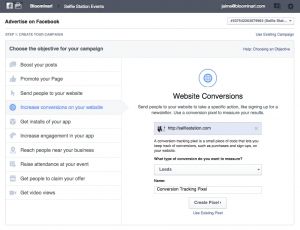
If you’re running Facebook ads or boosted posts, Facebook will automatically show you some great data about how many people see your ad and how many people are taking action by liking, sharing, or commenting on your ad. You’ll also see how many people are clicking to go to your website. By default, though, Facebook won’t tell you how many people actually converted as a result of your ad.
Luckily, this is easy for us to fix. Follow these simple steps to gain better insights into your company’s ad performance!
Why should I add conversion tracking to my website?
Facebook conversion tracking helps you understand:
- How many ad-referred visitors are taking action on your website
- Which ad or boosted post is leading to the most conversions
Without conversion tracking, you’re left guessing about which sales or mailing list sign-ups were the direct results of your paid advertising. It’s hard to justify investing money in online ads if you don’t know how many sales you received as a result.
All you need to set up Facebook conversion tracking is a Facebook ads account, a clear understanding of the conversion you’re tracking, and the page you’re going to be using to track the conversion. Here are a few examples:
- Purchases of a product are tracked via visits to a unique thank you page.
- Sign-ups for a mailing list are tracked via visits to a unique thank you page.
- Views of a key page, like a unique whitepaper download page, are tracked by visitors to that specific page.
You may even have multiple conversion types on your website, which is totally okay! Facebook will let you track as many as you want. Just make sure you select the right one when you create your ad or boosted post.
How do I set up Facebook conversion tracking?
- Go to Conversion Tracking and click on create a pixel.
- Facebook will ask you what kind of conversion you’re tracking. Select from Checkouts, Registrations, Leads, Key Page Views, Adds to Basket, or Other Website conversions.
- Give your pixel a name that you’ll remember.
- A box will pop up called view pixel code. Copy its contents.
- Go to the page you’re using to track that conversion and paste the code inside the tags. Save the page once you’re done.
Facebook Boosted Posts Vs. Ads
Facebook Advertising: Should You Use Boosted Posts, Ads, or Both?
Many small businesses are looking to Facebook as a cost-effective way to get their content, deals, and offers in front of new potential customers. In this blog post, we’ll walk you through the two main ways of advertising on Facebook — boosted posts and ads — and give you the knowledge you need to get started!
Boosted Posts
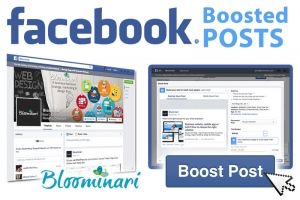
If you’ve posted anything to your business’ Facebook Page, you’ve probably seen a blue button, reading “Boost Post,” in the lower-right corner of each post. Clicking on this button will begin the boosted post creation process.
Boosted posts enable you to easily get a larger audience for a single specific Facebook post. Since you can include as much or as little information as you want in your post, you can make your paid content very informative. You’ll instantly see how many more people you can reach with a boosted post than an unboosted post.
Your Content, the News Feed, & Facebook’s Algorithm

Have you ever wondered why you don’t see every single post from your Facebook Friends or the Pages you’ve Liked? Or why your company’s posts aren’t seen by everyone who’s liked the page?
Social networks, by the numbers…
The average 18–49-year-old Facebook user has at least 200 Facebook friends. And, as a whole, the average Facebook user creates 90 posts per month, which works out to an average of 3 posts per day.
Facebook doesn’t use a chronological timeline, in which you see every single post from every Friend. If they did, though, perhaps we could conclude that the average user would have to sift through 600 posts per day!
In comparison, the majority of Twitter users are following less than 50 people. However, the Twitter user creates an average of 4.422 tweets per day or 132.66 tweets per month.
Twitter does use a chronological timeline. However, the math works out to be an average maximum of 221.1 posts per day, fewer than the average daily Facebook feed.
What is Facebook’s algorithm, anyway?
Facebook uses a proprietary algorithm to determine what posts show up in your News Feed. This is intended to provide a better experience for the user; after all, 600 posts per day is a lot!
The algorithm is constantly being updated; fortunately for us, Buffer is keeping track of all of the relevant changes!
What does Facebook’s algorithm love?
First, here are four key factors that make it more likely for the algorithm to show you a post: